
📘 Book Progress: ■□□□□□□□□□ 10% Complete
Level 1 - Book 1 - Chapter 8
Types of Orders
Understanding these order types is essential before learning automated trading
Estimated Reading Time: 12 - 15 Minutes
Introduction
Knowing when to buy or sell is only part of successful trading.
You also need to know how to enter the market.
Forex brokers provide several order types that allow traders to enter or exit trades automatically at predefined prices.
Professional traders rarely sit in front of the computer waiting for the perfect moment. Instead, they use pending orders, stop losses, and take profits to execute their trading plans automatically.
Understanding these order types is essential before learning automated trading.
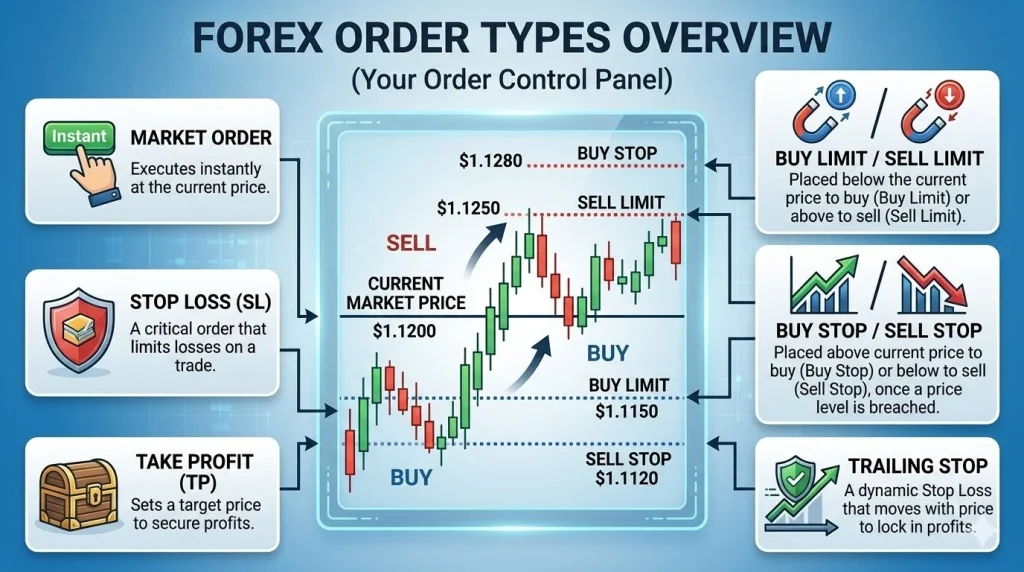
Market Order
A Market Order is an instruction to buy or sell immediately at the best available market price.
It is the simplest and most commonly used order type.
Example
EUR/USD
Current Price
1.1850
You believe the Euro will rise.
You click Buy.
Your broker executes the trade immediately at the current Ask price.A
Advantages
✔ Instant execution
✔ Simple to use
✔ Ideal for active trading
Disadvantages
✖ Price may differ slightly during high volatility (slippage)

Pending Orders
A Pending Order tells your broker to wait until the market reaches a specific price before opening the trade.
This allows traders to plan trades in advance without constantly watching the market.
There are four main pending orders.
Buy Limit
A Buy Limit order is placed below the current market price.
You expect the price to fall first and then rise.
Example
Current EUR/USD
1.1850
Buy Limit
1.1800
When the market falls to 1.1800, your Buy trade opens automatically.
Sell Limit
A Sell Limit order is placed above the current market price.
You expect the price to rise first before falling.
Example
Current EUR/USD
1.1850
Sell Limit
1.1900
When the market reaches 1.1900, your Sell trade opens automatically.
Buy Stop
A Buy Stop order is placed above the current market price.
It is commonly used for breakout strategies.
Example
Current Price
1.1850
Buy Stop
1.1880
If price breaks above 1.1880, the Buy order is activated automatically.
Sell Stop
A Sell Stop order is placed below the current market price.
It is also commonly used for breakout trading.
Example
Current Price
1.1850
Sell Stop
1.1820
If price falls below 1.1820, the Sell order opens automatically.
Stop Loss (SL)
A Stop Loss automatically closes your trade if the market moves against you.
Its purpose is to limit potential losses.
Example
Buy EUR/USD
Entry
1.1850
Stop Loss
1.1820
Maximum Risk
30 pips
Without a Stop Loss, losses could continue increasing if the market moves sharply against your position.
Take Profit (TP)
A Take Profit automatically closes your trade when your target profit is reached.
Example
Buy EUR/USD
Entry
1.1850
Take Profit
1.1910
Target Profit
60 pips
Using a Take Profit helps traders follow their trading plan instead of making emotional decisions.
Trailing Stop
A Trailing Stop automatically moves your Stop Loss as the trade becomes profitable.
This helps protect profits while allowing the trade to continue if the trend remains strong.
Example
You Buy EUR/USD
Entry
1.1850
Trailing Stop
30 pips
As the price rises, the Stop Loss moves upward automatically, locking in profits while giving the trade room to continue.
Which Order Type Should You Use?
| Order Type | Best Used For |
|---|---|
| Market Order | Immediate trade execution |
| Buy Limit | Buying after a pullback |
| Sell Limit | Selling after a rally |
| Buy Stop | Buying a bullish breakout |
| Sell Stop | Selling a bearish breakout |
| Stop Loss | Limiting risk |
| Take Profit | Locking in profits |
| Trailing Stop | Protecting profits during trends |
Real Trading Example
Suppose EUR/USD is trading at 1.1850.
A trader expects:
- Price may pull back to 1.1820 before continuing higher.
Instead of watching the chart all day, they place:
- Buy Limit: 1.1820
- Stop Loss: 1.1790
- Take Profit: 1.1880
If the market reaches 1.1820, the order is opened automatically according to the plan.
Common Beginner Mistakes
❌ Entering trades without a Stop Loss
❌ Placing pending orders at incorrect price levels
❌ Moving Stop Loss further away after entering a trade
❌ Removing the Take Profit because of greed
❌ Using Market Orders when a Pending Order would provide a better entry
Key Takeaways
✔ Market Orders execute immediately.
✔ Pending Orders execute only when price reaches a specified level.
✔ Buy Limit and Sell Limit are used for pullback entries.
✔ Buy Stop and Sell Stop are used for breakout entries.
✔ Stop Loss protects your trading capital.
✔ Take Profit locks in gains automatically.
✔ Trailing Stops help protect profits during trending markets.
Frequently Asked Questions
What is the safest order type for beginners?
There is no single safest order type. However, every trade should include a Stop Loss to manage risk effectively.
When should I use a Buy Limit?
Use a Buy Limit when you expect the market to decline to a support area before continuing upward.
When should I use a Buy Stop?
Use a Buy Stop when you expect the market to continue rising after breaking above a resistance level.
What happens if my Stop Loss is triggered?
Your broker automatically closes the trade to limit further losses.
Can I change my Stop Loss or Take Profit after opening a trade?
Yes. Most trading platforms allow you to modify Stop Loss and Take Profit levels while the trade is still open.
Continue Your Journey
- Chapter 1 – What is Forex Trading?
- Chapter 2 – The History of The Forex Market
- Chapter 3 – Currency Pairs
- Chapter 4 – How Forex Prices Move
- Chapter 5 – Reading Forex Quotes
- Chapter 6 – Pips, Points & Lot Sizes
- Chapter 7 – Leverage & Margin
- Chapter 8 – Types of Orders
- Chapter 9 – Bid, Ask & Spread
- Chapter 10 – Trading Sessions
Other Learning Lints:
- Forex Trading Automation OverviewPrevious Chapter
- AI Trading
- Algorithmic TradingNext Chapter
- Copy Trading
- Expert Advisor (EA)
- Gold Strategy
- Portfolio Automation
- Professional Trading Workflow
- Quantitative Trading
- Signal & Alert
- Trading Automation Roadmap
- Why Automate Trading
- Learn Forex
- Weekly Analysis
- Market Outlook
- Gold Outlook
- Blog
Automation Insight
Order types are the foundation of every automated trading system. An Expert Advisor (EA) doesn’t click buttons—it sends precise instructions to the broker. Whether entering immediately with a Market Order or waiting with a Pending Order, the EA follows predefined rules without hesitation or emotion.